# Convert an ESD File to a WIM File for Driver Updates in Your Windows Image*
Convert files from Electronic Software Delivery (ESD) form to Windows Imaging Format\* (WIM\*) if you need to add updated device drivers.
**How to convert files:**
Windows image files may be in the form of an ESD. Files must be WIM to make updates to drivers. Use the Deployment Image Servicing and Management\* (DISM) tool from Microsoft to update image files.
To convert the image files, follow the steps below:
**Note**
Always back up all files before following the process below.
1. Create a folder (ex c:\\Win10USB).
2. Go to the sources directory on your installation media.
3. Copy the install.esd file to the Win10USB folder.
4. Open Command Prompt as Administrator (Windows Key + X -> Command Prompt (Admin)).
5. Change directory to the working directory (cd c:\\Win10USB).
6. Show the available images within the install.esd file. dism /Get-WimInfo /WimFile:install.esd
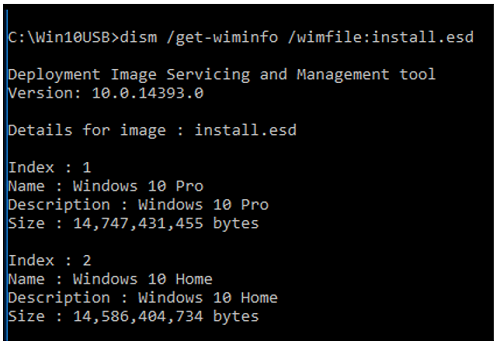
7. Determine the Index number to modify (in this example we are modifying Index 2)
8. Export the image to a WIM file. dism /export-image /SourceImageFile:install.esd /SourceIndex:2 /DestinationImageFile:install.wim /Compress:max /CheckIntegrity

You now have an install.wim file alongside the install.esd.
**Note**
If more versions of the OS need to be exported, simply repeat **Step 7** changing the corresponding SourceIndex and it will be added.
9. Backup the original install.esd and then replace on your installation media with the new install.wim.